
This guide explains how to integrate the LicensingSys.Pro (LSP) WHMCS Modules to automate license provisioning, activation, and renewals directly from your WHMCS installation.

WHMCS Module Integration Guide
Download Required Files #
Please download the following components:
✔ LSP WHMCS Server Module
✔ Licensing WHMCS Addon Module
✔ pre.sh Installer Script
Module Downloads #
WHMCS Integration #
1.1 WHMCS Server & Addon Module #
The Server Module handles automated license provisioning and the Addon Module provides extended license management features inside WHMCS.
Installation Steps: #
Upload Module
- Upload
ZIP FILEto your WHMCS directory. - Extract the
ZIP FILEto your WHMCS directory
Configure Token
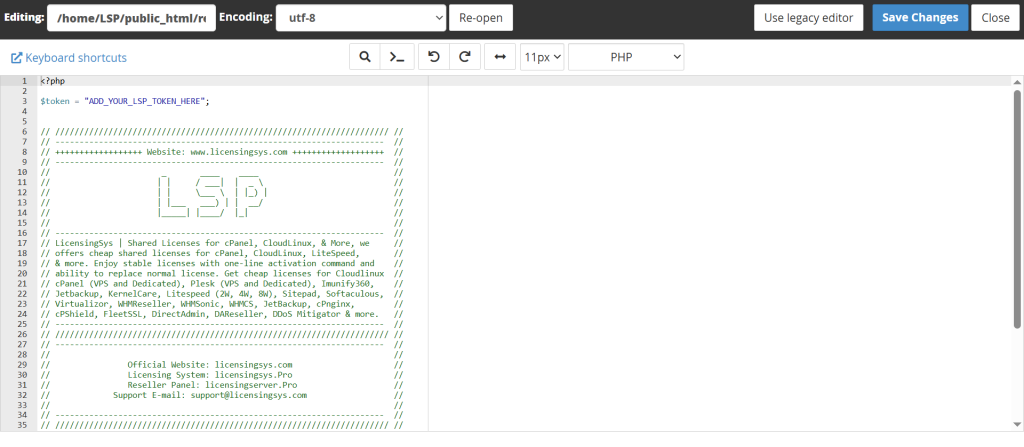
Navigate to:
modules/servers/LSP/token.php
modules/addons/licensing/token.php
Replace “ADD_YOUR_LSP_TOKEN_HERE” with your actual reseller token:
$token = "ADD_YOUR_LSP_TOKEN_HERE";
After replacing:
$token = "LSPSD9832YHUBEF89233NSDI38HEU";
Save the both file
Note: make sure to replace the token in both files, both modules must be installed and configured for full functionality.
🔑 Where to Find Your Token #
Login to:
Reseller Panel → WHMCS Integration
Example token:
LSPSD9832YHUBEF89233NSDI38HEUInstaller Script Setup #
Upload Installer Script #
Upload pre.sh to:
api.yourdomain.comExample:
https://api.yourdomain.com/pre.sh
Set Permissions #
chmod 755 pre.shEnsures the script is executable.
Setting Up Products in WHMCS #
3.1 Create Product Group #
Login to WHMCS Admin Area
Navigate to:
System Settings → Products/ServicesClick Create a New Group
Example:
cPanel Licenses3.2 Create Product #
Click Create a New Product.
Basic Configuration #
| Setting | Value |
|---|---|
| Product Type | Other |
| Product Group | Your Group |
| Product Name | Example: cPanel License |
| Module | LSP Licensing System |
Custom Field Setup #
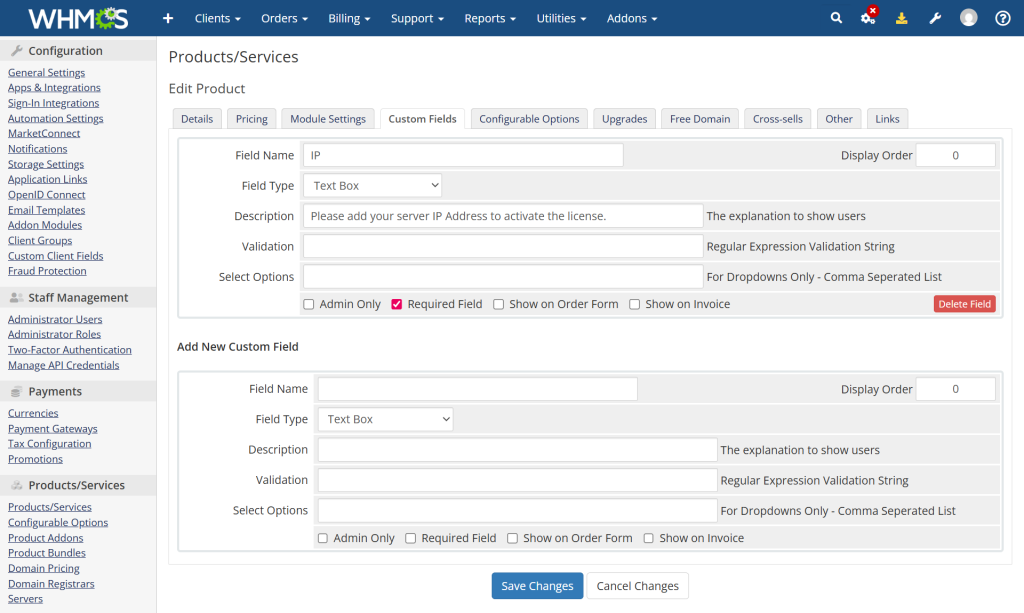
cPanel Licenses
| Field Name | IP |
|---|---|
| Type | Text Box |
| Required | Yes |
| Description | Please enter your server IP Address |
Module Settings #
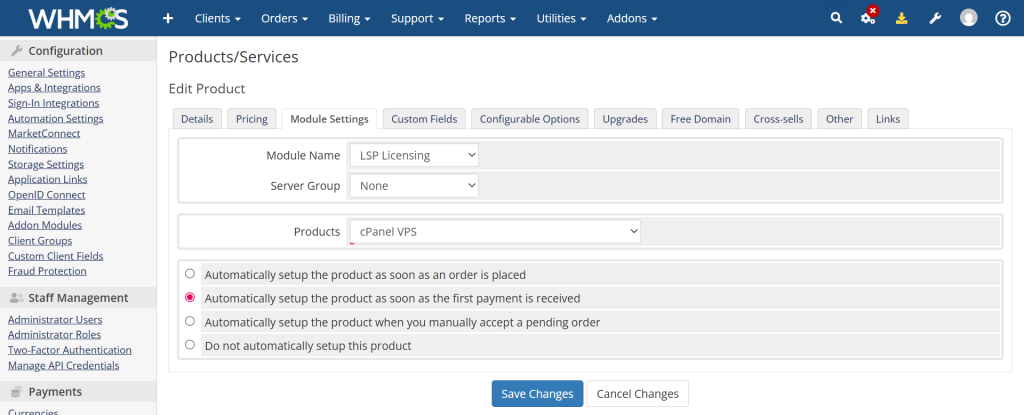
| Setting | Value |
|---|---|
| Module Name | LSP Licensing System |
| Server Group | None |
| Products | Select software |
Save product.
What If I Don’t Have WHMCS? #
No problem.
You can manage licenses directly via our reseller portal:
Issue, renew, activate, and monitor licenses without WHMCS.
Benefits of WHMCS Integration #
✔ Automated license provisioning
✔ Automatic renewals
✔ Client self-management
✔ Reduced manual workload
✔ Professional billing workflow
🛠Need Help? #
If you encounter any issues:
✔ Module setup
✔ Token configuration
✔ Product creation
✔ License automation
👉 Contact Support


